Everything it does, and where it does it.
PHNTM One is a full assistant, not a chat box. Here is the whole surface: what runs on the device, what stays there, and the optional paths that can leave.
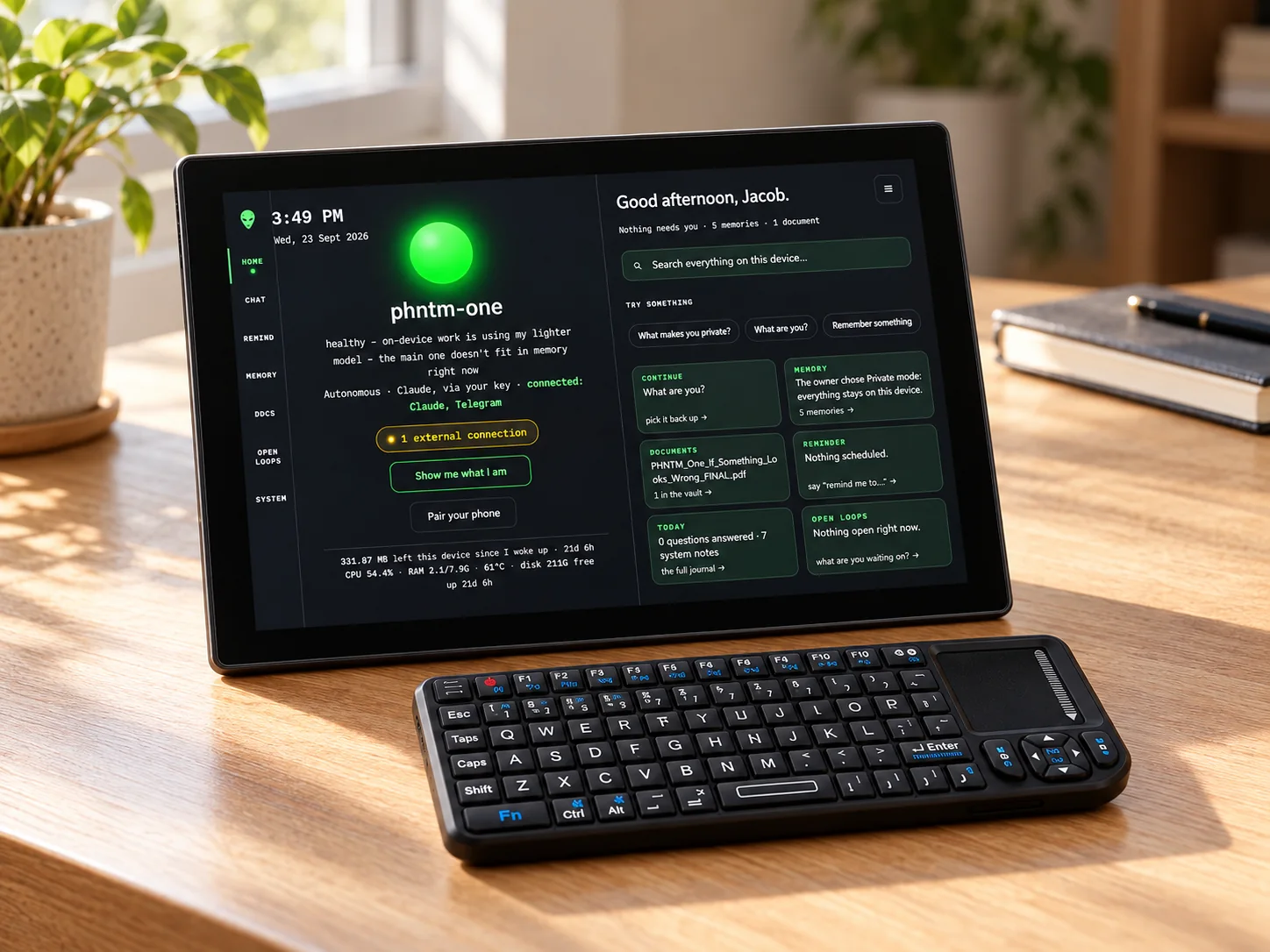
Eight systems at the core.
The core of PHNTM One 1.0, on the hardware on your desk. Pick one, or let it walk you through. Everything built on top of them is on the features page.
A real model, on the device
A Gemma 3 4B model answers from the box itself — with the internet unplugged. A smaller local model takes over if memory runs short, and the device says so. After an idle spell the main model reloads, and that first answer is slower.
It remembers what matters
It builds a personal, on-device memory of your names, projects and preferences — and recalls them by meaning, not keyword. Correct it and the old fact is superseded; ask it to forget and it does. Everything lives in one place: the box on your desk.
Give it your documents
Hand it your files and it indexes them locally for retrieval-augmented answers grounded in your own material — and it tells you when it is answering from a document versus from the model. Delete a document and it leaves the index too.
Talk to it, out loud
Tap the mic or press Alt+M for a local voice conversation. Manual Talk stops on silence, another tap, or after 15 seconds. Optional local wake detection is a separate setting, off by default.
Your machine, from your pocket
Scan the on-screen QR once and a private chat opens in your phone’s browser — no app store, no account, no cloud relay in between. PHNTM Drop lets you send text and files straight from the phone into the assistant, all across your own network.
It closes the loop
Set one-off and recurring reminders, pause or skip them, and let it track open loops so nothing falls through. Reminders survive restarts — the schedule lives on the device, not in a browser tab.
Built to be questioned
Watch the Wire counts what your conversation sends (zero in Private mode unless you've connected Telegram or email) next to every byte the whole machine sends to the internet — verify it yourself with tcpdump. The box watches its own disk, memory and services, heals stuck services, and reports what it did in plain language.
You own the whole thing
It is a Debian Linux computer. SSH is documented and never removed. Take Everything exports your data, and owner-initiated updates roll themselves back if a self-test fails — nothing changes underneath you.
And the everyday things, built in.
The same private core, doing the jobs you'd expect from a voice assistant, without the cloud those usually need.
Timers, alarms and lists
Documented · local Several named kitchen timers with on-screen countdowns and a completion chime; say or type “set a timer for 10 minutes” in English, Italian or Spanish. Timers use the device clock and are not set when it cannot be trusted. Documented · local Notes is available on the current device, and a shopping-list skill ships with this release (Device → Connect → Skills). A preinstalled pack of to-do and other everyday tools remains planned 1.0 scope, not yet release-verified.
Photos and scans
A receipt, a letter, a whiteboard: drop a JPEG/PNG through PHNTM Drop and it reads the text on the device. Answers can cite the photo when the recognized text supports them; check the original.
Knows things offline
Planned · not release-verified Planned 1.0 capability, not yet release-verified: local Wikipedia and reference packs with source-linked answers. The current local model can answer general questions, but that is separate from a reference library.
Dictation and read-aloud
Type a thought or record clips of up to 5 minutes in Notes. Review the transcript, then choose Clean up, Develop idea, or Project checkpoint. Originals are saved separately from AI drafts; processing stays local in every mode. Suggestions need your review. Notes and documents can be read aloud; speech recognition and spoken replies work in English, Italian and Spanish. Not yet release-verified.
Yours to run
The owner manual documents the Skills screen (Device → Connect → Skills), the on-screen Update Center (Device → Care → Updates), the Email and Google Calendar connection pages and the paired-devices list with Unpair (Device → Connect).
Private by default. Boosted or Autonomous when you choose.
Boosted and Autonomous stay off until you choose them. See it as a diagram on the privacy page.
Local inference, no required subscription
- Local inference stays on the device. Connected Telegram, email and calendar accounts have their own network paths.
- No account, no subscription, no cloud.
- The reason the product exists, and where most people stay.
A frontier model, your key
- Stronger on complex reasoning than the local model.
- Off by default, on your own credit.
- Not private: your prompt leaves the box, and every such answer is labelled. Local is always the fallback.
It acts, after you say yes
- Email and calendar, from your own private Telegram chat.
- Every send or change is shown in full and waits for your yes.
- Not private: what you ask goes to Anthropic and through Telegram. Off by default.
The fine print, in large print.
Deliberate trade-offs, stated plainly, so nothing surprises you after it arrives.
Capable, not magic
A 4B local model is genuinely useful, not a frontier model. It can be wrong, and the device always shows which brain answered.
A beat slower
A short answer usually takes tens of seconds (development unit: about 21 s to the first words, 38 s for a full answer) and a long one can run past a minute. The first answer after an idle spell is slower, while the model reloads.
Voice on your terms
Tap-to-talk is the default. Optional local wake detection is off until you enable it; Notes clips can run for up to 5 minutes.
Two ways out, both off by default
Boosted and Autonomous are the only settings that send your words off the box (plus Telegram or email, if you connect them). Both are off by default and use your own key. Boosted is labelled every time it applies.
8 GB budget
It runs within 8 GB on a Raspberry Pi 5. Bigger models don't fit, and that constraint is the point.
1.0 first, more later
This page describes current local functions and planned 1.0 additions; their statuses differ. The vision is labelled separately.
Your AI. On your desk.
Order yours. Built by hand, burned in and tested before it ships.
Order PHNTM One$799 · one-time · no subscription · made to order · ships within 7–10 business days after payment